Define the scene
Choose a curated preset or describe the scene in your own words — genre, instrument, texture, or tempo.
Royalty-free AI music for creators
Generate 100% original, copyright-free instrumental loops directly on your iPhone. Perfect for YouTube, TikTok, indie games, and podcasts. No cloud, no internet required, and no subscription fees.
Free on iPhone · Royalty-free instrumental music for creators, editors, and devs
Choose a curated preset or describe the scene in your own words — genre, instrument, texture, or tempo.
Murmur turns your prompt into musical style tokens and composes an original instrumental track directly on your phone.
Save as high-quality WAV, then AirDrop to Final Cut Pro, Premiere, or Unity — or share straight to TikTok and Instagram Reels.
App demo
From scene prompt to edit-ready WAV. Built for editors on the go.
Watch Murmur score your cut — describe the scene and generate an original instrumental track on your iPhone.
Watch on YouTubeLive mode
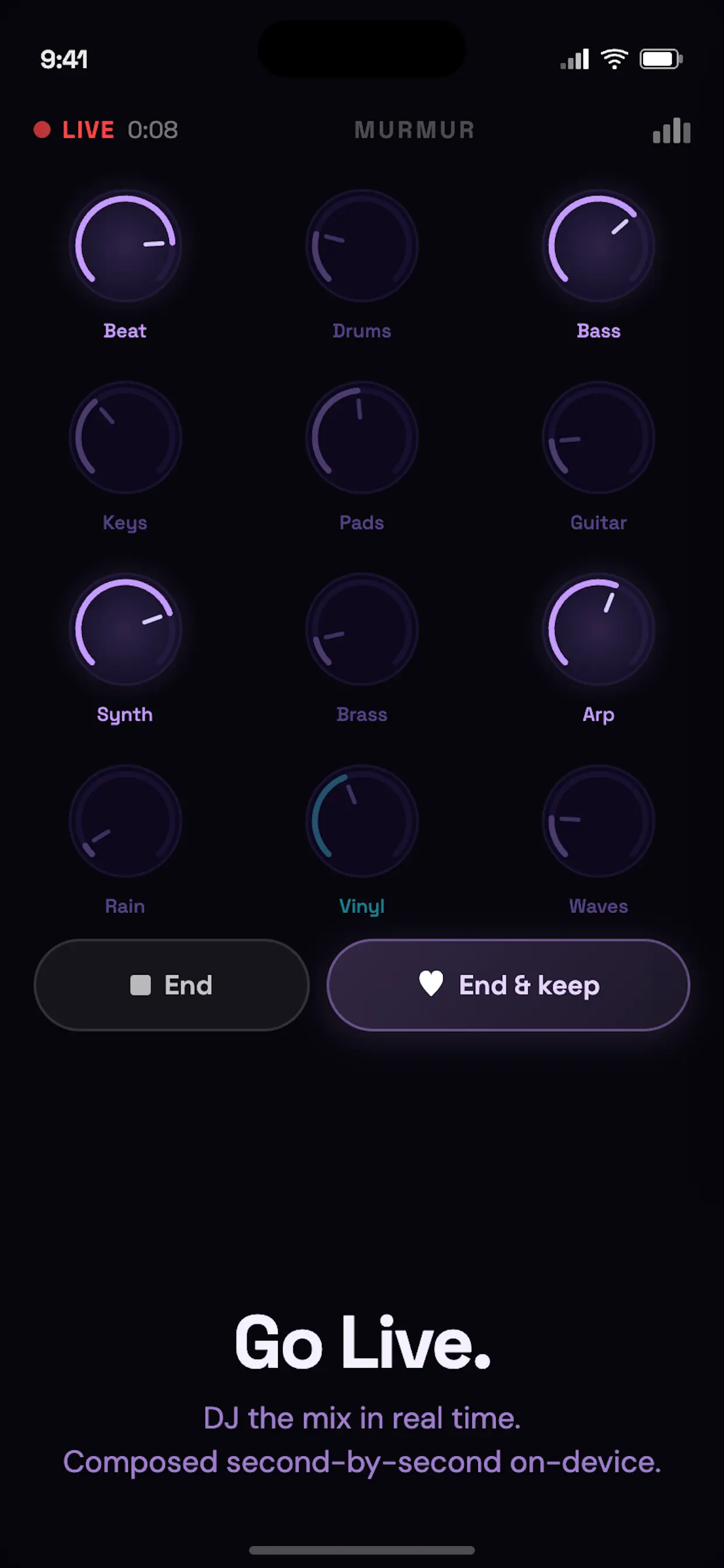
DJ the mix in real time. Composed second-by-second on-device.
Pick a starting instrument, tap Go Live, and Murmur streams an instrumental set on your iPhone. Turn the knobs to bring layers like beat, bass, keys, pads, guitar, synth, strings, brass, and arps in and out — the music morphs without ever stopping. Like the jam? Save it straight to your Library.
Live sessions run for a few minutes — real-time generation heats up your iPhone, and thermals can slow the engine to protect the chip. As future iPhones get faster, Live mode will only improve.
Murmur runs entirely on your iPhone — from style tokens to the final waveform, with no cloud in between.
Google's real-time music generation model, running locally.
Core ML acceleration on the iPhone's ANE chip.
Your prompts and audio never leave your phone — with no expensive cloud data servers generating your music.
Describe the vibe of your B-roll, menu screen, or reel. Murmur turns your prompt into musical style tokens and composes an original instrumental soundtrack on-device — genre, instruments, rhythm, tempo, and texture.
Scoring your project…
Turning your scene prompt into a soundtrack
Tap a category to hear a short preview. Cinematic, electronic, jazz, and more — built for background loops and edits.
Original background music for the workflows that actually need it.
Generate seamless background tracks that never trigger Content ID strikes. Every loop is original to you.
Create dynamic ambient soundscapes and looping menu music on the fly — without hunting for stock audio.
Need a track for a reel while editing on a plane? Generate offline, anywhere in the world.
Export ready
Export high-quality WAV files instantly. AirDrop straight to Final Cut Pro, Premiere, or Unity — or share directly to TikTok and Instagram Reels. No re-encoding, no upload queue, no stock-site licensing maze.
From Cinematic and Electronic to Jazz and Ambient — each preset is tuned for background loops, menus, and reels.
Type a genre, tempo, or sonic texture for your scene. Murmur translates your prompt into musical style tokens on-device.
Generation runs entirely on your iPhone using the Apple Neural Engine. No cloud rendering, no upload wait.
Saved tracks live in your Library with waveform playback, rename, trim, fade — ready when your edit needs them.
Organize generated tracks with waveform playback, rename for your project, trim and fade — then export when the cut is ready.
Murmur Pro · One-time purchase
Murmur is free to start with core presets and short previews. Pro unlocks the full studio — one-time purchase, no monthly fees to cover cloud GPU costs.
Download on the App StoreRoyalty-free AI music, on-device generation, and commercial use — answered.
Yes. Live mode streams a continuous instrumental set, composed second-by-second on your iPhone by a dedicated fast on-device engine. Pick a starting instrument, tap Go Live, and the music starts within seconds — then steer it like a DJ with the knob deck, fading layers like beat, bass, keys, pads, guitar, synth, strings, brass, and arps in and out while it plays. You can save the jam to your Library when you're done.
Live sessions are limited to a few minutes at a time. Real-time generation is intensive — as your iPhone warms up, thermals can slow the engine to protect the chip. Murmur is built for jamming and capturing a take, not hour-long sets. Save your session to the Library before it ends. As future iPhones get faster and more efficient, Live mode will only get better.
No. Murmur is a pure instrumental music generator. It is designed specifically to create high-quality background soundscapes, lo-fi beats, and cinematic loops that fit seamlessly under video production and indie games without vocal clutter.
Yes. All music generated with Murmur Pro is 100% royalty-free and cleared for commercial use. Because the AI generates raw audio locally on your device, every track is completely unique to you — meaning zero copyright claims or Content ID strikes.
Yes. Murmur generates AI music entirely on your iPhone using Magenta RT and the Apple Neural Engine. Your prompts and generated audio are processed locally — not sent to a cloud server for rendering.
Murmur is built for privacy. The core music generation flow runs on-device, so your prompts and generated instrumentals stay on your phone. We don't collect your audio, and there's no cloud rendering step.
Murmur is designed for private, on-device AI music generation on iPhone. Once the AI models are downloaded, you can compose instrumental tracks from presets or your own scene prompts without relying on cloud generation.
You pick a preset or describe a scene in your own words. Murmur translates that text into musical style tokens, then Magenta RT composes an original instrumental track directly on your iPhone — accelerated by the Apple Neural Engine.
You need a connection the first time to download the AI models. After that, generation runs locally on your phone. Murmur doesn't require cloud rendering for each new piece of music you create.
Most AI music tools render in the cloud, which means expensive GPU servers and costly monthly subscriptions. Murmur generates music on your iPhone instead — no cloud rendering, no expensive data servers to run, and no pricey subscription just to cover infrastructure. You get private, local generation with instrumental output, 170+ curated presets, and custom scene prompts powered by on-device AI.